



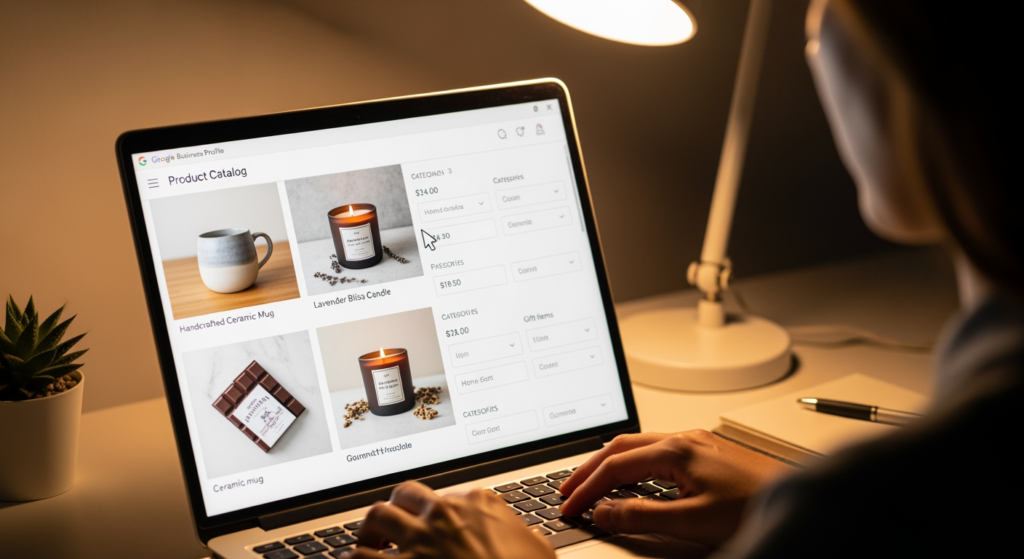
Setting up products inside your Google Business Profile can feel deceptively simple—add a photo, a price, a button, done. But if the details are inconsistent, incomplete, or hard to understand at a glance, you can end up with listings that confuse customers instead of converting them. This guide is for local business owners and managers who want a practical, repeatable way to publish GBP products that are accurate, scannable, and aligned with how people actually browse on Google Search and Maps.
We’ll focus on structure (what to include), clarity (how to write and price items), and governance (how to keep everything consistent across your online presence). If you want the bigger picture of how your profile supports local visibility, start with Understanding the Role of Google Business Profile in Local SEO Success.
What You Need to Know First
- Products in GBP are a browsing experience. Think of them as a mini-catalog customers scan quickly from Search/Maps.
- Clarity beats cleverness. Use plain names, straightforward prices, and short benefits so customers can decide fast.
- Consistency matters. Match names, prices, and availability to your website and other listings where possible.
- Use categories intentionally. Group items the way customers shop (e.g., “Lawn Care Packages” vs. “Misc”).
- Maintain them like inventory. Review regularly so outdated offers don’t create support issues or bad reviews.
How Google Business Profile Product Listings Actually Work
Google Business Profile product listings let you showcase individual items or packaged offerings directly on your profile. Depending on the business type, customers may see these items when they find you on Google Search or Google Maps, then tap into product details such as photos, price (or price range), description, and a link to learn more or buy.
Unlike a full e-commerce store, these listings are designed for quick decision-making. People are often comparing nearby options, checking pricing signals, and looking for “do you offer this?” answers without leaving Google. The goal isn’t to publish everything you sell—it’s to publish the most useful, most searched, and most profitable items in a format that’s easy to scan.
What a strong product entry typically includes
- Specific name: “AC Tune-Up (Seasonal)” is clearer than “Maintenance.”
- Accurate price or range: Enough to qualify leads and reduce time-wasting calls.
- Short description: What it is, who it’s for, and what’s included.
- Clean photo: A real, relevant image that matches the offering.
- Relevant link: A page that matches the product (service page, booking page, product page).

The Real Business Impact of Getting Products Wrong
When product listings are incomplete or misleading, the cost usually shows up in small, annoying ways that add up: more unqualified calls, more “how much is it?” back-and-forth, and more customer frustration when expectations don’t match reality.
- Time cost: Your team spends more time explaining basics that the listing could have clarified.
- Lead quality issues: Missing pricing signals can attract the wrong audience (or repel the right one).
- Trust friction: Outdated offers or inconsistent details can make your business look disorganized.
- Operational headaches: A promoted item you no longer offer can trigger refund requests or negative reviews.
Common Missteps We See (Checklist)
- Using vague names: If the name doesn’t match what a customer would search for, it’s easy to ignore.
- Leaving prices blank “to be safe”: This often increases low-intent inquiries and price-shopping calls.
- Writing descriptions like ads: Overly promotional copy can hide the actual inclusions customers need to understand.
- Uploading irrelevant photos: Generic images can reduce confidence and create confusion about what’s being sold.
- Linking to the homepage for everything: If the click doesn’t land on a matching page, customers bounce.
- Publishing too many items at once: A cluttered catalog makes it harder for the best offers to stand out.
A Practical Setup Plan for Your Product Catalog (Checklist)
- Choose 6–12 “starter” items: Pick your best-sellers, highest-margin services, and most-requested offerings.
- Create customer-first categories: Group by how people buy (packages, repair types, popular add-ons).
- Standardize naming: Use a consistent pattern (Service + qualifier + size/term), and keep it readable.
- Set pricing rules: Use exact pricing when possible; otherwise use a realistic “starting at” or range that you can honor.
- Write a 2–3 sentence description: Include what it is, what’s included, and one qualifier (timeframe, size, or eligibility).
- Use high-intent photos: Show the real output (finished work, the product itself, before/after where appropriate).
- Link each item to a matching page: The page should repeat the same name, price framing, and inclusions.
- Add a review cadence: Re-check monthly (or whenever pricing/offers change) to prevent stale listings.
What We’ve Learned from Real-World GBP Cleanup Work
In practice, we often see that the biggest wins come from simplifying—not adding. When businesses reduce their catalog to a clean set of core offerings, align names and pricing with the website, and write descriptions that spell out inclusions, customers self-qualify faster and conversations start at a higher level.
When DIY Setup Stops Making Sense
You can usually handle basic product setup in-house. Consider getting professional support if any of the following are true:
- You have multiple locations and need consistent categories, naming, and pricing rules across profiles.
- Your services have complex pricing (variables, tiers, bundles) and you need a clean way to present ranges without misleading customers.
- You’re seeing frequent customer confusion (calls about items you don’t offer, price disputes, or mismatched expectations).
- Your website and profile don’t match and you need a coordinated update to avoid inconsistency.
- You don’t have time to maintain it and the catalog goes stale after initial setup.
Common Questions Answered
Do I need to list every item or service I sell?
No. A smaller, curated catalog is often easier to browse and maintain. Start with your most requested offerings and expand only when you can keep everything accurate.
Should I use exact pricing or a range?
If you can reliably honor an exact price, use it. If pricing depends on size, condition, or scope, a realistic “starting at” or range can set expectations while leaving room for an estimate.
What should I link to from each product?
Link to the most relevant page for that specific offering—typically a dedicated service page, product page, or booking page that repeats the same name and explains what’s included.
How often should I review my product listings?
Review whenever you change prices or offers, and consider a monthly quick check to catch outdated items, broken links, or photos that no longer reflect your work.
Can product listings help with local visibility?
They can support a stronger profile by giving customers more detail and improving engagement, but results vary based on your market, competition, and overall profile and website quality.
Taking Action
Product listings in your profile work best when they’re organized, accurate, and written for fast scanning. Start with a focused set of offerings, match your details to your website, and build a simple maintenance routine so your catalog stays trustworthy. If you want a cleaner setup that reduces confusion and supports your local SEO efforts, it helps to have a consistent system behind it.
Learn More About Our Services
Discover how we can help you achieve your goals.
