



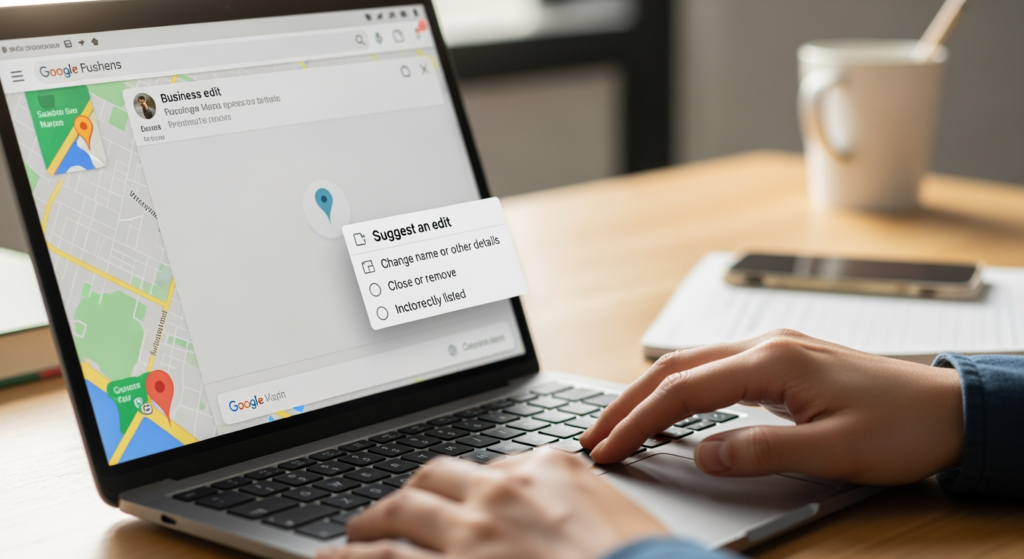
Seeing fake listings, keyword-stuffed business names, or businesses that don’t actually exist can be frustrating—especially when they show up ahead of legitimate companies. If you’re a local business owner, marketer, or even just a customer trying to find the right place, learning how to report Google Maps spam can help clean up results and make the map more useful for everyone. It matters because spammy profiles can mislead customers, waste your time, and create unfair competition in local search. The good news: you don’t need special tools to take action—you just need to know what to look for and how to submit a clear report that Google can evaluate.
If you want the broader context on how map visibility works (and why data accuracy matters), start with Understanding the Role of Google Business Profile in Local SEO Success.
Bottom Line Upfront: Reporting Map Spam
- Open the listing in Google Maps and use Suggest an edit or Report a problem to flag inaccurate details.
- Choose the most specific issue (fake location, wrong category, keyword-stuffed name, etc.) and keep your notes factual.
- Add supporting evidence when possible (photos, Street View context, official website details, or signage).
- Track your edits in Google Maps to see whether they’re applied, rejected, or pending.
- If the issue is severe or persistent, escalate via Google Business Profile support channels (especially if you manage a verified profile).
What Counts as Google Maps Spam (And What Doesn’t)
Not every “annoying competitor” is spam. Map spam generally means a listing is misleading, inaccurate, or designed to manipulate visibility rather than help users. Common examples include fake addresses, virtual offices presented as staffed locations, duplicate listings for the same business, and business names stuffed with extra keywords (like adding services and cities that aren’t part of the real-world name).
On the other hand, a listing you simply don’t like—or a competitor that outranks you—doesn’t automatically qualify. The goal is to focus on objective issues Google can verify: name, address, phone, category, location, and whether the business is actually operating as represented.

The Real-World Impact of Map Spam on Calls and Customers
Spammy map listings can create practical problems that go beyond “SEO frustration.” Customers may call the wrong number, drive to a non-existent location, or book services with a business that’s misrepresenting itself. For legitimate businesses, spam can siphon off high-intent searches—people who are ready to call, request a quote, or get directions.
It also adds operational cost: more time spent explaining confusion to customers, more time monitoring your market, and more time working to rebuild trust when users have a bad experience. Reporting bad listings won’t guarantee a specific outcome, but consistent, well-documented reports can help improve the accuracy of what customers see.
Common Reporting Mistakes That Get Ignored (Checklist)
- Reporting out of frustration instead of facts: Vague complaints are harder to evaluate than specific inaccuracies.
- Picking the wrong issue type: If the problem is the name, report the name—not the category or location.
- Using “SEO language” instead of real-world language: “Keyword stuffing” is real, but describing the exact extra words is more helpful than labeling it.
- Submitting edits without evidence: When you can, include photos, Street View context, or official sources.
- Expecting immediate changes: Some edits apply quickly; others can take time or be rejected.
- Mass-reporting multiple listings at once without details: Separate, clear reports are usually easier to review.
Your Step-by-Step Action Plan to Report a Spam Listing
What you’ll achieve: You’ll submit a clear, reviewable report in Google Maps that flags the specific problem and increases the odds of a meaningful correction.
Prerequisites
- A Google account (recommended for tracking contributions).
- The exact listing you want to report (copy the Google Maps link if possible).
- Basic evidence (optional but helpful): photos, Street View observations, the business’s official website, or public records.
-
Open the listing directly in Google Maps.
Search the business name and click the profile so you’re reporting the correct entity (especially in markets with similar names).
Tip: Copy the listing URL and keep it in a notes doc so you can reference it later.
-
Choose the right reporting option.
Look for options like Suggest an edit, Suggest an edit → Change name or other details, or Report a problem (wording varies by device and interface).
Tip: If the issue is the business name, use the name-edit path. If it’s something like “place is permanently closed,” use the closure/reporting path.
-
Select the most accurate issue type.
Examples: incorrect name, incorrect address, wrong pin location, doesn’t exist, duplicate, wrong hours, wrong category.
Tip: Match the issue to what a customer would say is wrong (e.g., “This address is a UPS Store, not a staffed business location”).
-
Write a short, factual explanation.
Keep it simple: what’s wrong and what the correct information should be. Avoid accusations you can’t prove.
Tip: Use a “before/after” format: “Listing name shows X. Real-world business name is Y (as shown on website/signage).”
-
Add supporting evidence when available.
If the interface allows photos, upload relevant images (signage, storefront, suite directory). If not, rely on verifiable sources like the company website or clear Street View context.
Tip: Evidence should support the specific field you’re correcting (name evidence for name edits, location evidence for address edits).
-
Submit and document what you sent.
After submitting, note the date, the issue type, and what you requested. This helps if you need to follow up later.
Tip: Take a quick screenshot of the listing and the incorrect detail for your records.
-
Check status and follow up if needed.
Google may accept, reject, or leave the edit pending. If it’s rejected and you’re confident it’s inaccurate, consider resubmitting with clearer evidence.
Tip: Space out repeated attempts and improve the clarity of your evidence each time.

Professional Insight: What Most Successful Reports Have in Common
In practice, we often see that the reports most likely to get traction are the ones that read like a simple quality-control ticket: one listing, one clear problem, one clear correction, and a real-world source that supports it. The more your report looks like “helping Google fix bad data” (instead of “trying to win a fight”), the easier it is for a reviewer—or an automated process—to act on it.
When DIY Reporting Isn’t Enough
- The spam listing keeps returning: If edits stick briefly and then revert, you may need a more structured escalation path.
- There are many duplicates or a network of fake listings: Bulk issues can require a systematic audit and documentation.
- You’re dealing with address misrepresentation in a competitive market: These can be harder to prove without strong evidence.
- Your own listing is being harmed: If your profile is getting incorrect edits or suspicious changes, it’s time to tighten controls and get guidance.
- You need a broader local visibility plan: Cleaning up map results helps, but it works best alongside strong on-site signals, accurate citations, and a well-optimized profile.
Common Questions About Reporting Map Issues
How long does it take for an edit to show up?
Timing varies. Some changes can appear quickly, while others may stay pending or be rejected. It often depends on the type of edit and how easy it is to verify.
Can I report a business name that looks stuffed with extra services?
Yes. If the listing name includes words that don’t match the real-world business name, you can suggest a name correction and include a short explanation based on verifiable sources.
What if the location is a virtual office or mailbox store?
If the listing presents a staffed location but evidence suggests it’s not a real customer-facing office, report the address/location issue as accurately as you can and include objective context (like Street View or building directory details).
Should I contact the business owner before reporting?
You can, but you don’t have to. If the issue is clearly inaccurate and affects users, reporting through Google Maps is a direct path. If it’s a genuine mistake, the owner may also be able to correct it.
Will reporting guarantee my business ranks higher?
No. Cleaning up inaccurate listings can improve map quality, but local visibility depends on multiple factors. Focus on accuracy, relevance, and a strong overall local SEO foundation.
Taking Action Without Overthinking It
Reporting spammy map listings is one of the few things you can do today that directly improves the accuracy of what customers see. Keep your reports specific, evidence-based, and focused on one issue at a time. If you’re in a market where spam is persistent, pair reporting with a stronger local SEO strategy so your business is harder to outrank with gimmicks. When you want a second set of eyes, getting expert help can save time and reduce guesswork.
Book Your Consultation
Schedule a free consultation with our experts.
