



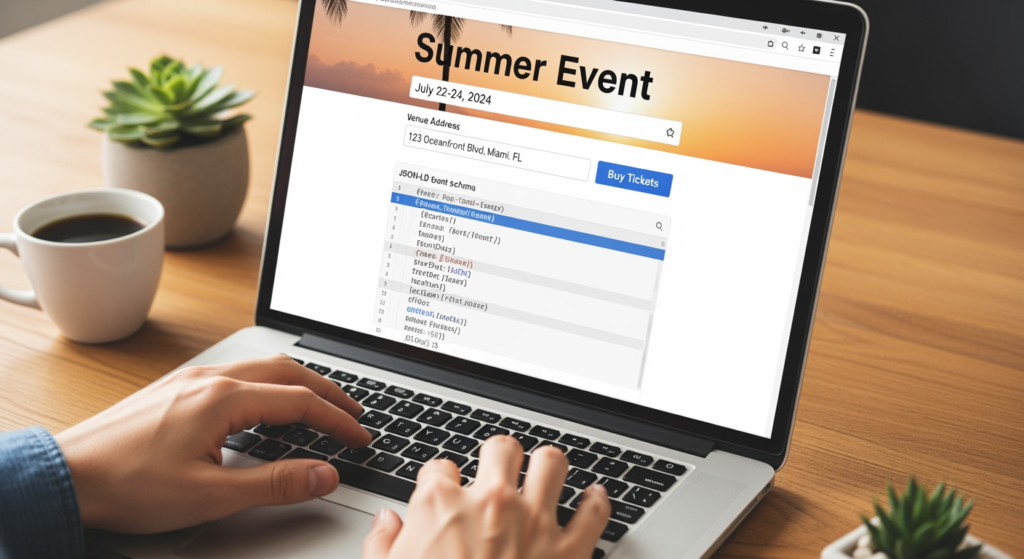
Summer events create a short window to get found—before tickets sell out, vendors book up, or your “first annual” becomes your “we should’ve marketed this earlier.” If you’re promoting a festival, concert series, charity run, pop-up, or seasonal workshop, you’re not just competing with other events—you’re competing with distractions. AI Overviews SEO is about improving the chances that search engines can confidently summarize your event and recommend it for the right queries.
This how-to is for local business owners, event organizers, and marketing teams who want practical steps to make event pages clearer, more trustworthy, and easier for AI-driven search features to understand. You’ll learn what to publish, how to structure it, and what to avoid so your event details aren’t buried—or worse, misunderstood. For a deeper foundation on local visibility factors that influence discovery, see Understanding the Role of Google Business Profile in Local SEO Success.
If you’re hosting an event in Athens, your timeline is even tighter because seasonal searches spike fast and fade fast. If you want hands-on support aligning your event page, Google Business Profile, and site structure, our AI Overviews SEO in Athens, GA team can help you build a plan that fits the dates you can’t move.
Key Points to Know Before You Publish
- Use one dedicated event page per event with a clear title, date, location, and “what it is” summary near the top.
- Make your event details consistent across your website, Google Business Profile posts, and major listings (especially name, address, and time).
- Add Event schema (JSON-LD) so search systems can interpret dates, venue, offers, and performers without guessing.
- Answer common attendee questions on-page (parking, age limits, rain plan, refunds) using plain language.
- Update the page after the event (photos, recap, next date) instead of deleting it—useful history can support future events.
How AI Overviews Interpret Summer Event Pages
AI-driven search features typically build summaries from sources they can parse quickly: clearly written page copy, structured data, consistent business/entity info, and corroborating mentions across the web. For events, that means your page needs to make the “who/what/when/where/how much” unmissable.
Think of it like giving AI a clean recipe instead of a mystery stew. If your date is buried in an image, your location is “downtown” (helpful… emotionally), and your ticket link goes to a generic homepage, the system has to infer details. The more it has to infer, the more likely it is to skip, misstate, or choose another source.
AI Overviews SEO isn’t about tricking a system—it’s about publishing event information in a format machines can read and humans can trust. That includes clear headings, scannable sections, and structured data that matches what’s visible on the page.
The Real Cost of Getting Event SEO Wrong
Event marketing is unusually sensitive to timing. If your page is unclear or incomplete, you may lose early discovery when people search “things to do this weekend” or “summer concerts near me.” That can affect ticket sales, vendor interest, sponsorship conversations, and even whether local media picks it up.
There’s also a customer experience cost. Conflicting start times, missing parking info, or unclear refund policies can lead to more calls and emails, more no-shows, and more negative reviews—none of which help future events.
Finally, there’s an operational cost: fixing event details across multiple platforms at the last minute is stressful. A clean, consistent event page becomes your “single source of truth,” so you’re not playing whack-a-mole with outdated info.
Mistakes That Quietly Kill Event Visibility (Checklist)
- Using a flyer image as the main source of details: Search systems can miss text embedded in images, and users can’t easily copy/share key info.
- Publishing the event as a blog post with no structure: Without clear sections (date/time/location/pricing), details get scattered and harder to summarize.
- Multiple URLs for the same event: Splits signals and can confuse both users and crawlers (e.g., “/events/” page + separate “/tickets/” page with different info).
- Inconsistent naming across platforms: “Summer Jam 2026” vs. “Summer Jam Fest” makes it harder to connect mentions and reviews to one entity.
- Missing or incorrect time zone/date formatting: Especially risky for multi-day events or events near time zone borders.
- Letting the page expire into a 404: You lose history and links that could support next year’s event.
Your Step-by-Step Action Plan for AI-Friendly Event Pages
What you’ll achieve: a single, well-structured event page that’s easy for people to use and easier for AI systems to summarize accurately.
Prerequisites:
- Access to your website CMS (WordPress, Shopify, etc.)
- Confirmed event details (name, date, start/end time, venue address, pricing, ticket/RSVP link)
- A primary contact email or phone number for attendee questions
-
Create one dedicated page per event (not a PDF upload).
Tip: Use a clean URL that won’t change (e.g., /events/summer-concert-series-2026/). If you run it annually, consider a stable “series” page plus a specific page for the current year.
-
Put the essentials in the first screen of content.
Tip: Near the top, include: event name, date, start/end time, full venue name + street address, and a clear ticket/RSVP button. If it’s free, say “Free” explicitly.
-
Write a plain-language summary that answers “what is this?”
Tip: In 2–3 sentences, describe the event format (live music, vendor market, 5K, workshop), who it’s for, and what attendees can expect. Avoid inside jokes and acronyms as the only descriptors (save those for the afterparty).
-
Add scannable sections for common questions.
Tip: Use short headings like Parking, Accessibility, Age Policy, Rain Plan, Refunds, What to Bring, and Schedule. This helps both users and AI extract specifics.
-
Implement Event schema (JSON-LD) that matches the visible details.
Tip: Include startDate, endDate, location (with address), organizer, and offers (price, currency, availability) when applicable. Make sure schema and on-page text agree exactly.
-
Connect the event to your organization entity.
Tip: Link from your homepage or an Events hub page to the event page. If the event is hosted by your business, ensure your NAP (name/address/phone) is consistent sitewide.
-
Publish supporting content that answers intent-based searches.
Tip: Add a short “Plan your visit” section (nearby parking, arrival time, entry rules). This can help you show up for queries like “where to park for [event]” or “is [event] kid friendly.”
-
Distribute consistent details across your key profiles.
Tip: Update your Google Business Profile with an Event post (or updates) and ensure the same event name/date/location appear on any major listings you control.
-
After the event, update—don’t delete.
Tip: Add a recap, photos, highlight sponsors/vendors, and include “Next date TBD” or link to the next event page. If you must retire the page, 301 redirect it to the most relevant replacement.
Professional Insight: The “Single Source of Truth” Pattern
In practice, we often see summer events struggle because details live in too many places—an Instagram graphic says one time, a ticketing platform says another, and the website page is “coming soon” until the week of. The simplest fix is to treat your website event page as the canonical source, then make every other channel point back to it and match it.
When DIY Event SEO Needs Backup
- You have multiple dates, venues, or performers: Multi-day events and series benefit from careful schema and page structure.
- Your event details keep changing: You’ll want a process to update site, schema, and listings without introducing inconsistencies.
- You’re not sure schema is implemented correctly: Incorrect structured data can be worse than none because it creates conflicting signals.
- Your event is tied to sponsorships or significant revenue: Higher stakes justify professional review so the basics don’t get missed.
- You’re competing with many similar events: You may need stronger local relevance signals, clearer differentiation, and better internal linking.
Common Questions Answered
Do I need a separate page for each summer event?
For most events, yes. A dedicated page keeps details consistent, earns links over time, and gives search systems one clear URL to summarize and reference.
Should I keep last year’s event page live?
Often, yes—especially if it has backlinks or gets recurring traffic. Update it with a recap and link to the current event page, or redirect it if the old page no longer serves users.
What matters most for AI-driven summaries: schema or on-page text?
Both matter, and they should match. Schema helps machines parse details, while visible text builds clarity for users and reinforces the same facts.
Can I rely on my ticketing platform page instead of my website?
You can use a ticketing platform for checkout, but it’s usually better to have your own event page as the primary reference, then link out for tickets or registration.
How early should I publish my event page?
As soon as the core details are confirmed. Earlier publishing gives more time for discovery and for other sites or profiles to reference the same consistent information.
The Path Ahead
A strong summer event page is clear, consistent, and structured so both people and AI systems can understand it quickly. Focus on one authoritative URL, publish the essentials up top, add Event schema that matches the page, and keep your details aligned everywhere you promote. When you do that, you reduce confusion and improve the odds that your event shows up for the searches that matter most during a short season.
Book Your Consultation
Schedule a free consultation with our experts.
