



May is when a lot of local businesses feel the same pressure at the same time: phones should be ringing, quotes should be moving, and your website should be doing more than “existing.” If you’re relying on a single Services page, it can be hard to match what searchers want in the moment—especially when they’re comparing three providers in one sitting. This case study breaks down how local service pages can be structured to turn more of that high-intent traffic into calls and form submissions.
This is written for owners and marketers at service-based businesses (home services, professional services, specialty trades) who want a practical page framework—not theory. If you want a wider foundation on how local visibility works, start with Understanding Local SEO for Service-Based Businesses in Competitive Markets.
Bottom Line Upfront: What Converted
- One service = one page (not one page for “everything”), so visitors land on the exact offer they searched for.
- Above-the-fold clarity: a specific headline, a short proof point, and one primary call-to-action (CTA) reduce decision friction.
- “Process + expectations” sections help pre-qualify leads and cut down on vague inquiries.
- Trust elements placed near the CTA (not buried in the footer) support action when the user is ready.
- Conversion tracking is part of the page build so you can see what’s working and iterate without guesswork.
The May Conversion Problem: Good Traffic, Lukewarm Leads
Background/context: This example follows a multi-location service business preparing for a busier late-spring stretch. They already had steady website sessions and a decent Google Business Profile presence, but conversions didn’t rise proportionally as demand picked up.
The challenge: Most visitors landed on a general Services page and had to “self-navigate” to figure out whether the company handled their exact need. In May, people often shop fast—so if the page doesn’t immediately confirm relevance, they bounce and call the next listing.
The situation we were solving: The site needed landing pages that matched specific service intent, answered common pre-sale questions quickly, and made it easy to take the next step on mobile.
What We Built: A High-Intent Service Page Template
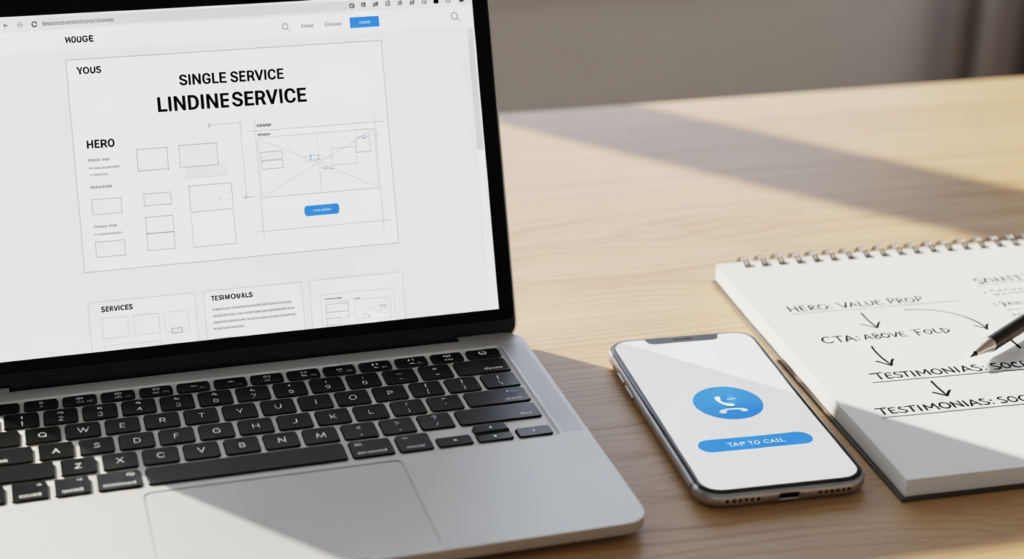
The approach taken: We replaced the “one page for all services” approach with a repeatable service-page template. Each page focused on one core service and used a consistent conversion layout so users didn’t have to relearn the site every time.
Template elements used:
- Hero section with specificity: service name + who it’s for + primary CTA (call or request form).
- Short credibility block: a concise “why choose us” set of bullets (experience, responsiveness, warranty/guarantees only if true, etc.).
- Service overview: what it includes, what it doesn’t, and what a typical appointment or project looks like.
- Common problems we solve: a short list that mirrors real customer language (the stuff people type into search at 11:30 p.m.).
- Process section: 3–5 steps from first contact to completion, with time expectations stated carefully (ranges, not promises).
- Pricing guidance: “what affects cost” factors, plus a clear path to get a quote (without publishing numbers you can’t stand behind).
- Trust near conversion points: reviews, certifications, photos of work, and a simple FAQ-style reassurance block.
- Secondary CTA: repeated after the main objections are addressed (not repeated every 12 inches like a pop-up carnival).
Why this matters in May: spring demand can increase comparison shopping. A page that confirms relevance fast and reduces uncertainty tends to earn the click-to-call.

Results We Looked For (and What Changed)
Results and outcomes: Because businesses measure “conversion” differently, we evaluated outcomes using tracking signals that most service companies can implement without heavy tooling:
- More qualified inquiries: forms included clearer project details because the page set expectations upfront.
- Higher intent calls: call leads were more likely to reference the exact service described on the page.
- Better user flow: fewer users bounced after the first page because the content answered “am I in the right place?” quickly.
- Cleaner measurement: each service could be evaluated on its own page performance rather than guessing which service the generic page supported.
Important note: conversion improvements depend on factors like traffic sources, competition, seasonality, and how quickly your team responds to leads. The goal here is a repeatable page system you can refine over time.
The Real Cost of a Generic Services Page in Peak Season
When demand is high, a vague page doesn’t just “convert a little less.” It can create hidden costs that show up in your calendar and your inbox:
- Lost speed-to-lead advantage: if visitors can’t confirm fit quickly, they call someone else first.
- More unqualified contacts: unclear service definitions invite “Do you also do…?” messages that eat staff time.
- Price-first conversations: without value framing and process clarity, prospects default to cost comparisons.
- Inconsistent sales experience: your team has to explain basics repeatedly because the site didn’t do it.
Common Missteps We See on Service Landing Pages (Checklist)
- ☐ Writing for everyone: broad copy (“We do it all!”) often fails to reassure the person with one urgent problem.
- ☐ Hiding the CTA: if the phone number or form is hard to find on mobile, you’re asking users to work too hard.
- ☐ Skipping objections: no mention of timing, process, service area, or what affects cost leaves uncertainty.
- ☐ Overloading the page: giant walls of text, sliders, and multiple competing buttons can reduce action.
- ☐ Thin “trust” signals: a logo strip without context rarely answers “Can I trust you with my money?”
- ☐ No tracking plan: if you can’t attribute calls/forms to a page, you can’t improve it with confidence.
A May-Ready Build Plan You Can Implement (Checklist)
- ☐ Inventory your top services: list the 5–10 services that drive the most revenue or demand.
- ☐ Create one focused page per core service: keep each page tightly aligned to one intent.
- ☐ Write an “instant relevance” hero: headline + 1–2 proof bullets + one primary CTA.
- ☐ Add a simple process section: show steps, who does what, and what happens after the first contact.
- ☐ Include “what affects cost” guidance: explain variables so prospects understand why quotes differ.
- ☐ Place trust elements near decision points: reviews, credentials, and examples close to the CTA.
- ☐ Make mobile conversion effortless: tap-to-call, short forms, readable spacing, and fast load times.
- ☐ Set up measurement: track calls, form submits, and key button clicks per service page.

Professional Insight: The “Reassurance Gap” That Kills Conversions
In practice, we often see that service pages fail for one simple reason: they describe the service, but they don’t reassure the buyer. People aren’t only asking “Do you offer this?”—they’re asking “What happens after I click?” Pages that clearly explain the process, boundaries, and next steps tend to reduce hesitation and produce better-quality leads.
When DIY Service Pages Stop Being Enough
You can build a solid foundation yourself, but it’s usually time to get professional help when:
- You have multiple services but one catch-all page and you can’t tell which service drives inquiries.
- Your traffic is rising but leads aren’t (a sign the issue may be page structure, messaging, or UX).
- Mobile users bounce quickly and you suspect speed, layout, or CTA placement is the culprit.
- Your team is overwhelmed with low-quality inquiries and the site isn’t pre-qualifying prospects.
- You’re planning a seasonal push and need pages built and tracked correctly before demand peaks.
Frequently Asked Questions
Do I need a separate page for every service?
Not always. Start with the services that drive the most calls, revenue, or repeat demand. If a service has distinct buyers, pricing factors, or questions, it’s often a good candidate for its own page.
What should be above the fold on a service page?
A clear service-specific headline, a short credibility statement (one or two proof points), and one primary action (call or request form). The goal is to confirm relevance in seconds.
Should I list prices on my website?
It depends on how standardized your work is. If pricing varies, you can still explain what affects cost and provide a clear quote process. That helps reduce confusion without locking you into numbers you can’t honor.
How do I know if my page is converting well?
Track actions that matter: calls from the page, form submissions, and key button clicks. Compare performance across services and look for patterns (for example, high traffic but low actions often signals a messaging or UX issue).
How long does it take to improve conversions after changes?
It varies based on traffic volume and seasonality. The practical approach is to implement tracking first, make one or two changes at a time, and review performance over a consistent window so you’re not reacting to normal weekly swings.
Taking Action Before May Demand Peaks
If your site is getting attention but not enough inquiries, the fix is often less about “more traffic” and more about matching intent with a focused page experience. Build one strong service page template, apply it to your top offerings, and measure each page so you can improve with confidence. Over time, this creates a site that’s easier for customers to understand—and easier for your team to sell from.
Get Your Free Quote
Find out how we can help with a no-obligation quote.
